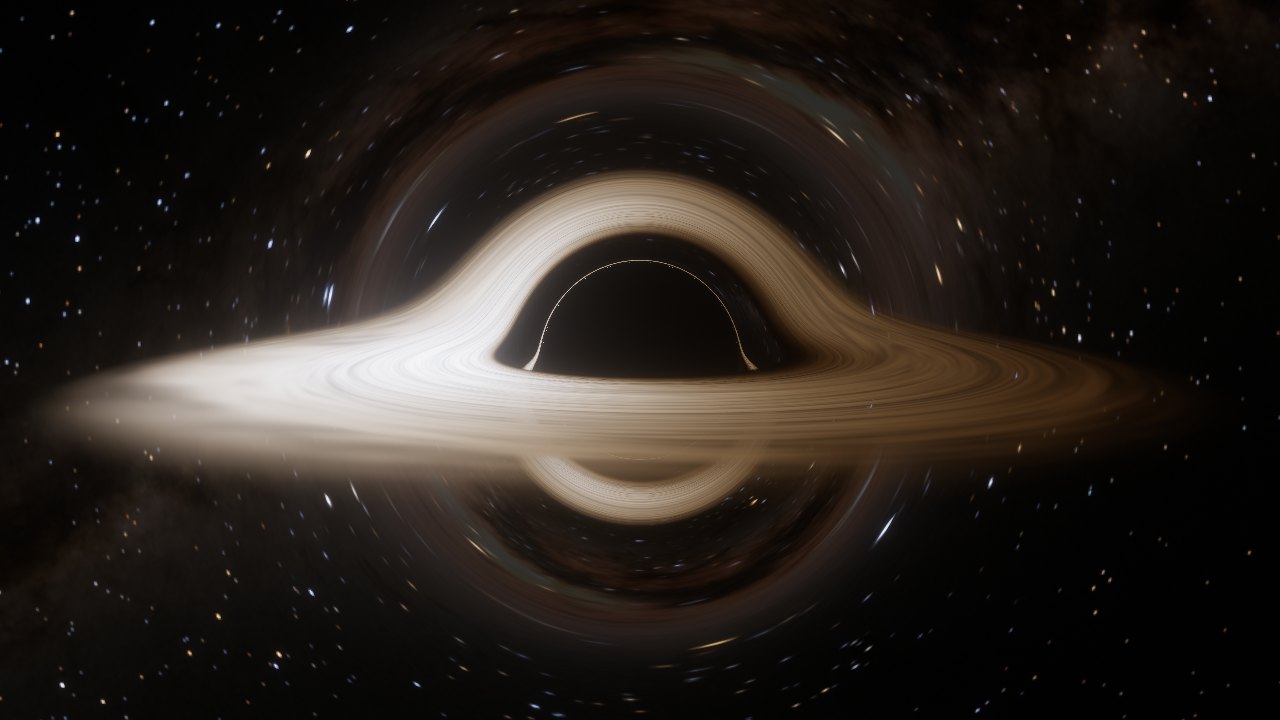
This browser could not start WebGL2, so here is a still frame instead.
3D-18 · Schwarzschild ray tracer
Black Hole
18.0 rs -- fps High
Drag to orbit · pinch or Ctrl + scroll to zoom
More belowControls
How it works
Every pixel follows a ray of light
Bent light
For each pixel the shader sends a light ray backwards from the camera and integrates its path through the Schwarzschild geometry. In units where the Schwarzschild radius rs = 1 the orbit obeys u″ + u = 3⁄2 u² with u = 1/r; written as a 3D acceleration x″ = −3⁄2 h² x / r⁵, a leapfrog step works directly in Cartesian space. Rays with impact parameter below 3√3⁄2 rs fall in; those just above circle the photon sphere at 1.5 rs and draw the thin photon ring.
The disk
A thin disk runs from the innermost stable orbit (3 rs) outward. Its temperature follows the Novikov–Thorne flux of Page & Thorne, which vanishes at the inner edge and peaks near 4.8 rs. Each time a ray crosses the disk plane the shader adds the gas's emission, so the far side of the disk appears lifted over the top and under the bottom of the shadow.
Doppler beaming
Gas orbits at the Keplerian rate. A ray's frequency ratio g = √(1 − 3M/r) / (1 − Ωλ) combines gravitational redshift, time dilation and the Doppler shift. Because Iν/ν³ is conserved, a blackbody at temperature T is seen as a blackbody at gT, so the approaching side turns brighter and bluer while the receding side dims and reddens. The Film look switches these shifts off, as the makers of Interstellar did.
Real sky, real colours
The background holds the 9,096 stars of the Yale Bright Star Catalogue, placed by galactic coordinates with the galactic centre behind the hole and coloured from their B−V index, over NASA's Gaia-based map of the Milky Way's diffuse light, scaled to its real surface brightness relative to the stars. Disk and star colours come from Planck spectra integrated against the CIE 1931 colour matching functions, then bloom and an ACES tone curve finish the frame.
Sources
References
- O. James, E. von Tunzelmann, P. Franklin, K. S. Thorne (2015). Gravitational lensing by spinning black holes in astrophysics, and in the movie Interstellar. Class. Quantum Grav. 32, 065001.
- J.-P. Luminet (1979). Image of a spherical black hole with thin accretion disk. Astron. Astrophys. 75, 228.
- D. N. Page, K. S. Thorne (1974). Disk-accretion onto a black hole. Time-averaged structure of accretion disk. ApJ 191, 499.
- I. D. Novikov, K. S. Thorne (1973). Astrophysics of black holes. In Black Holes (Les Astres Occlus), Gordon & Breach.
- S. Chandrasekhar (1983). The Mathematical Theory of Black Holes, ch. 3. Oxford University Press.
- R. Antonelli. Starless: a Schwarzschild ray tracer (Cartesian form of the geodesic equation).
- E. Bruneton (2020). Real-time high-quality rendering of non-rotating black holes. arXiv:2010.08735.
- G. B. Rybicki, A. P. Lightman (1979). Radiative Processes in Astrophysics, §1.4 (invariance of Iν/ν³).
- C. Wyman, P.-P. Sloan, P. Shirley (2013). Simple analytic approximations to the CIE XYZ color matching functions. JCGT 2(2).
- F. J. Ballesteros (2012). New insights into black bodies. EPL 97, 34008 (B−V to temperature).
- NASA/Goddard Space Flight Center Scientific Visualization Studio (2020). Deep Star Maps 2020, Milky Way background in galactic coordinates; Gaia DR2: ESA/Gaia/DPAC.
- P. C. van der Kruit (2024). Pannekoek's Galaxy. J. Astron. Hist. Heritage; Table 3 (Milky Way surface brightness, used to calibrate the map).
- J. P. Snyder (1987). Map Projections: A Working Manual, USGS Professional Paper 1395, §22 (gnomonic area scale, for cube-map texel solid angles).
- D. Hoffleit, W. H. Warren Jr. (1991). The Bright Star Catalogue, 5th revised ed. CDS V/50.
- J. Jimenez (2014). Next generation post processing in Call of Duty: Advanced Warfare. SIGGRAPH course (bloom filters).
- K. Narkowicz (2015). ACES filmic tone mapping curve.
Controls
Fly around
- Drag, or arrow keys / WASD
- Orbit
- Pinch, Ctrl/⌘ + scroll, + / − or the zoom buttons
- Zoom between 2.2 and 60 rs
- Two fingers (touch)
- Tilt and zoom; one finger swipes sideways to orbit and up or down to scroll the page
- Space
- Cruise on or off
- R
- Reset view
- F
- Full screen
- H
- Hide or show the interface